Knowledge Centre
How to Read a PacifiCOAnalytics COA
Retatrutide 10mg, section by section.
This guide uses our Reta 10mg Certificate of Analysis from PacifiCOAnalytics (Pacific COA Analytics). Learn how to verify the report, match the batch to the vial, read purity and peptide content, and check endotoxin and heavy-metal results.
View the complete COA (PDF) ↗
Jump to a section
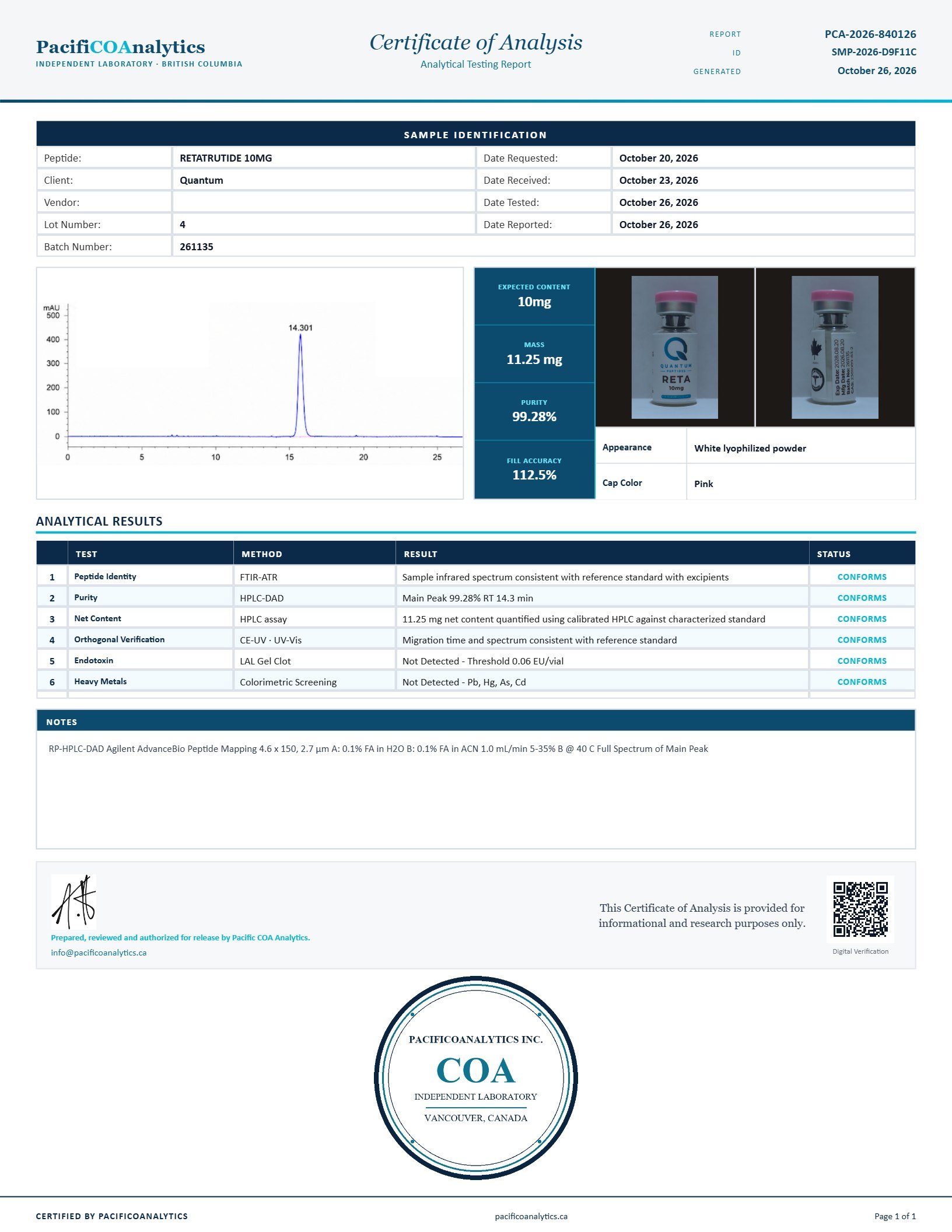
Start with the PacifiCOAnalytics name at the top left, the report number at the top right and the generated date below it. Here, the report number is PCA-2026-840126, generated on October 26, 2026.
The header also includes a separate sample ID. Use the PCA report number when looking up this certificate; it is different from the sample ID, lot number and batch number.
The QR code appears near the bottom-right corner of this certificate. Scan it or use the link below to open the PacifiCOAnalytics record for PCA-2026-840126.
Compare the product, batch, date and results with the PDF. The matching public record identifies Retatrutide 10mg, batch 261135, and an overall status of CONFORMS.
Verify this Reta 10mg report ↗Sample Identification lists the product, client, dates and tracking numbers. This report is for Retatrutide 10mg, submitted by Quantum, received on October 23 and tested and reported on October 26, 2026.
The separate Lot Number field reads 4. Do not confuse that field with the bottle’s batch number. If the batch numbers disagree, ask for the report that corresponds to the bottle.
- Expected content: 10 mg, matching the stated bottle strength.
- Mass / net content: 11.25 mg, measured by the HPLC assay listed in Analytical Results. Verify that measured peptide content is at least the mg stated on the bottle.
- Fill accuracy: 112.5% (11.25 mg ÷ 10 mg × 100). This compares measured content with the label claim; it is not the purity percentage.
- Appearance: white lyophilized powder, with a pink cap on the photographed vial.
Read each row across: Test → Method → Result → Status. On this report, CONFORMS is the lab’s passing status for the listed test. Read the result alongside it; a status alone does not tell you the measured amount or test sensitivity.
- Peptide Identity: FTIR-ATR; the sample’s infrared spectrum is reported as consistent with the reference standard with excipients.
- Purity: HPLC-DAD; the main peak is 99.28%, at approximately 14.3 minutes.
- Net Content: HPLC assay; 11.25 mg, quantified against a characterized standard. Compare this with the bottle’s 10 mg claim.
- Orthogonal Verification: CE-UV / UV-Vis; migration time and spectrum are reported as consistent with the reference standard. This adds a separate analytical check.
For combinations such as KLOW: check that every peptide has its own individual purity result. A single overall percentage does not describe each component.
Endotoxin: read the threshold and status
Find the Endotoxin row. This certificate uses LAL Gel Clot and reports a threshold of 0.06 EU/vial. Keep the units exactly as printed; EU/vial is not the same as EU/mL or EU/mg.
Passing result on this COA
“Not Detected - Threshold 0.06 EU/vial” with status “CONFORMS.” This means endotoxin was not detected at the reported screening threshold.
What a failure would mean
A result that does not meet the lab’s endotoxin criterion should carry a nonconforming or failed status, supported by a positive/detected result or a value above the applicable acceptance limit. Labels may read “Does not conform” or “Fail”; exact wording varies.
A positive gel-clot reaction indicates detection under the assay conditions. Detection and failure are not interchangeable without the relevant limit and valid test controls. “Not detected” does not establish zero endotoxin or sterility.
Method reference: Charles River’s explanation of gel-clot testing.
Heavy metals: read all four elements
Find the Heavy Metals row. This report uses Colorimetric Screening for lead (Pb), mercury (Hg), arsenic (As) and cadmium (Cd).
Passing result on this COA
“Not Detected - Pb, Hg, As, Cd” with status “CONFORMS.” The lab reports no detection of those four elements by this screening method.
What a failure would mean
If an element exceeds the lab’s acceptance criterion, expect a nonconforming or failed status and a result identifying the detected element or amount. For example, “Detected - Pb” would identify lead; detection alone does not tell you whether a specified limit was exceeded.
This certificate does not print numeric detection or acceptance limits for individual metals. Ask the laboratory for those limits when interpreting a detected result. Do not read “not detected” as zero metals, or treat this screening result as a quantitative ICP-MS analysis.
The chromatogram shows the detector signal over time. This example has a main peak labelled 14.301 minutes, consistent with the approximately 14.3-minute retention time in the purity row.
The report lists HPLC-DAD for purity and HPLC assay for net content. Use the reported 99.28% purity and 11.25 mg content; a tall peak alone cannot give you either number.
The Notes section records method details, including the column, mobile phases, flow and temperature. These help identify how the analysis was performed. A visually clean trace does not establish sterility or replace the separate endotoxin and heavy-metal screens.
The bottom of the certificate contains the release authorization, contact information, research-use statement and laboratory seal. Check these with the report’s public verification record.
Your 7-point PacifiCOAnalytics COA checklist
- Lab, report number and date: PacifiCOAnalytics is identified, with a unique PCA report number and issue date.
- Verification: the report ID or QR code opens a matching record on the laboratory’s website.
- Product and strength: the compound and expected mg match the bottle.
- Batch matching: the table, photographed rear label and your bottle show the same batch number.
- Measured content: the net peptide content in mg is at least the bottle’s stated amount.
- Identity and purity: review the reported results, methods and chromatogram. For blends, check each peptide’s individual purity.
- Endotoxin and heavy metals: check each result, method, applicable limits and status separately; investigate failed, missing or inconsistent results.
PacifiCOAnalytics states that results apply to the submitted sample. Matching batch numbers establish traceability; they do not show that every vial was tested. A COA does not certify sterility or suitability for human or veterinary use.
Source: PacifiCOAnalytics’ verified report and statement of scope.
Back to sections